A Google rep once stayed on a strategy call with a client of mine until we agreed to turn on auto-apply — and when I asked, point blank, how it would improve the account, he couldn’t answer. What he could tell me was that it would raise our “optimization score.” That’s the whole problem in one sentence. Somewhere along the way, advertisers started treating that score like a report card to push toward 100%. It isn’t one.
A recent Search Engine Land piece walks through several Google Ads recommendations worth scrutinizing, and it’s a good list. But the deeper point is the one underneath it: your optimization score doesn’t measure how well your account performs. It measures how closely you do what Google suggests. It’s a to-do list — and Google wrote it.
Your optimization score is not a grade
The number sits at the top of your account with a satisfying little percentage, and every fiber of your operator brain wants to get it to 100. Resist that. The score reflects your alignment with Google’s recommendations, not your results. You can run a lean, ruthlessly profitable account and sit at 70% because you’ve declined a stack of suggestions that would’ve loosened your targets and widened your reach. You can also hit 100% by rubber-stamping every recommendation and quietly torch your CPA. The score doesn’t know the difference, because performance was never what it was measuring.
Whose optimization is it, exactly?
Here’s the part worth sitting with. Recommendations come from a counterparty whose business is your ad spend. That’s not a conspiracy — it’s just an incentive structure, and it’s important to name it. Plenty of recommendations are genuinely useful (fix a disapproved ad, add a missing sitelink). But a meaningful share of them nudge you toward more spend, more automation, and less control — and they’re framed as “optimizations” either way. The fix isn’t to ignore them. It’s to read each one like a proposal from someone across the table, not an instruction from your own analyst.
Four recommendations worth reading twice
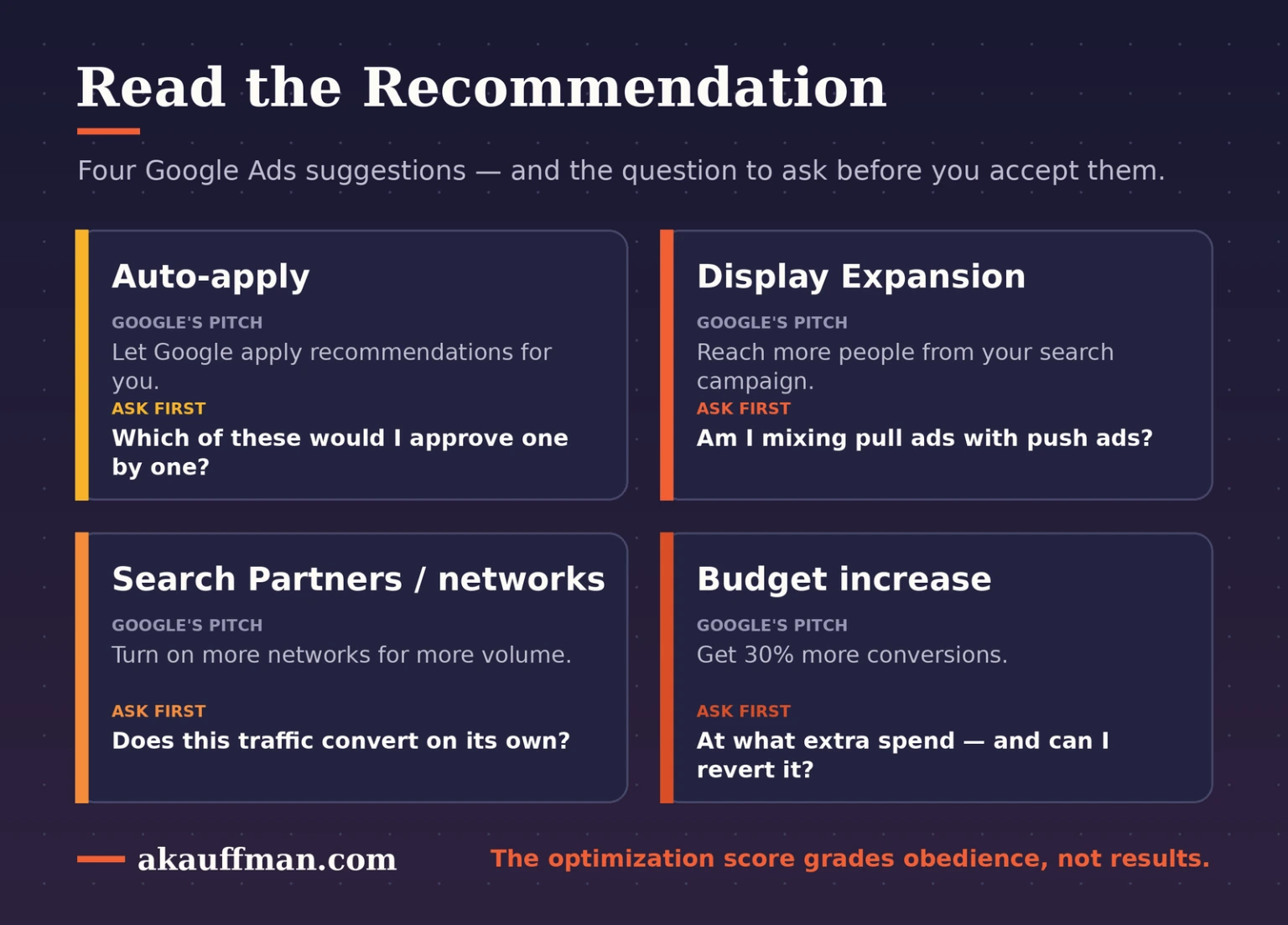
These four come up constantly, and each deserves a specific question before you accept it.
1. Auto-apply
Auto-apply is separate from the Recommendations tab — it lets Google implement changes in your account without you ever clicking approve. Some options are benign (optimized ad rotation). Others are anything but: letting Google rewrite your responsive search ad copy, enable Display Expansion, or set your own target CPA and ROAS. Only opt into the categories you’d approve one at a time. Regulated industries should never auto-accept generated ad copy, and no one with real efficiency targets should hand Google the keys to those targets — especially now that the Aug. 17 change turns your target into a contract and reshapes how budget-limited campaigns spend. Tellingly, Google itself pulled the “add responsive search ads” option out of auto-apply in early 2026. Even Google walks these back.
2. Display Expansion
Search and display are opposite motions. A search ad is a pull: it answers intent someone already has. A display ad is a push: it interrupts someone mid-scroll to build awareness. They need different creative, different metrics, and different expectations — display runs a far lower click-through and conversion rate by design. Bolt display onto a search campaign (outside Performance Max) and you’ll get a flood of cheap impressions that flatters your volume and quietly wrecks your efficiency numbers. It’s the same “that spike isn’t a win” trap in a different costume.
3. Search Partners and network settings
Google loves to recommend turning on more networks for more volume. Before you do, check two things. First, know where your Demand Gen campaigns actually serve — Google buries that control at the ad-group level, and I’ve watched campaigns quietly drift onto low-quality placements with doubled CPAs. Second, evaluate Search Partners separately from Google Search using the network segment. If that traffic doesn’t convert on its own merits, stay opted out unless you have a volume goal you genuinely can’t hit any other way.
4. Budget recommendations
“You could get 30% more conversions.” What that pitch never leads with is the spend required to get there — sometimes several times your current budget for a marginal lift. One real example making the rounds: a recommendation to double a daily budget for an estimated 0.75 extra conversions a week. Two things make this worse than it looks. Once Google raises a budget, it won’t lower it back for you. And since a mid-2026 pacing change, campaigns push toward the full monthly limit (roughly 30.4× your daily budget), so a bump compounds faster than you’d expect. Model the true cost against the true benefit — the way you’d pressure-test any target against real business math — then monitor it and revert if it isn’t earning.
The optimization score isn’t a measure of how well your account performs. It’s a measure of how closely you do what Google wants.
How to handle recommendations without chasing the score
You don’t need to fear the Recommendations tab — you need a process for it. Turn off auto-apply, or enable only the genuinely routine categories. Read every recommendation asking one question: does this serve my numbers, or Google’s? Judge every network and placement on its own performance, not on a blanket “more is better.” Model the real cost of anything that promises more volume. And monitor every change you accept, because if it doesn’t work, Google won’t undo it — you will.
My POV: chase results, not the score
This is the cleanest line I know between a vendor and a partner. A vendor pushes your optimization score to 100% because it’s easy to screenshot in a report and it keeps the Google rep happy. A partner treats every recommendation as a proposal from a counterparty and holds themselves accountable to the only scoreboard that pays the bills — your CPA, your ROAS, your pipeline. The optimization score is Google’s to-do list for your account. Your P&L is the actual grade, and it’s the only one worth optimizing for.
The bottom line
Google’s recommendations aren’t the enemy, and they aren’t gospel — they’re suggestions from a company that profits when you spend more. Read them that way. Before you accept one, know exactly where your ads will run, what it will cost, and what you should expect in return, then check it against your own performance data. Do that, and a 68% optimization score with a great return beats a 100% score that’s quietly bleeding money every single time.
Not sure which recommendations to trust?
If your Google Ads account is buried in recommendations and you’re not sure which ones actually serve your goals, book a free strategy call and we’ll audit what’s auto-applying, what’s costing you, and what’s worth keeping.