For four years the honest answer to “can I tell Performance Max to spend less on Display?” was no. You could feed it assets, audience signals, search themes and negatives, and then you could watch. Late last month that changed. Google is alpha-testing a “Channels” setting inside PMax that lets you raise or lower how much the campaign prioritizes each channel: Search, Search partners, Discover, YouTube, Maps, Gmail and Display.
This is the control advertisers have been asking for since PMax launched. It is also the fastest way I’ve seen yet to turn a working campaign into an expensive one. Both things are true, and the second one is the part nobody’s writing about.
What actually changed
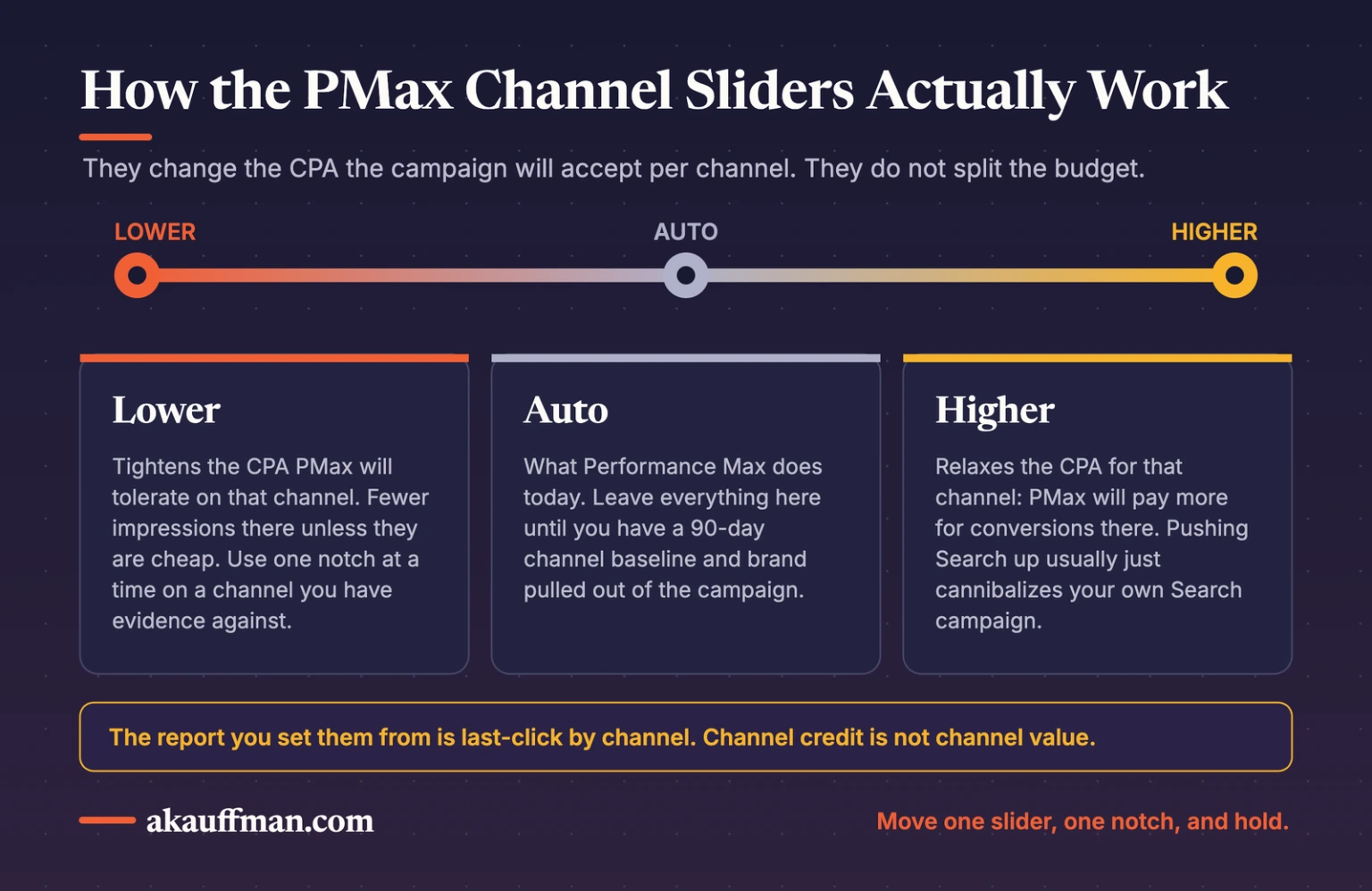
Spotted by Heidi Sturrock on August 25 and written up by Search Engine Land and PPC News Feed, the feature adds a slider per channel inside campaign settings. Each slider runs from Lower to Auto to Higher. Auto is what PMax does today.
Here’s the mechanism, because it matters: the sliders don’t split your budget. They adjust the CPA the system is willing to pay on that channel when you’re on Target CPA bidding. Push YouTube to Higher and PMax will accept a worse CPA for YouTube conversions. Pull Display to Lower and it tightens the CPA it will tolerate there, which means fewer Display impressions unless they’re cheap. You’re changing the economics of each channel, not drawing a pie chart.
It’s alpha. Google hasn’t announced it, there’s no rollout date, and most accounts don’t have it. If you don’t see it, ask your rep. If you do see it, keep reading before you touch it.
Why this is a big deal
Performance Max has been a black box with a window bolted on. Channel-level reporting arrived in 2025 and finally showed where the money went, and for a lot of accounts the answer was uncomfortable: a large slice on Display and Gmail, a quiet dependence on brand search, and YouTube spend nobody asked for. You could see it. You couldn’t do anything about it short of pulling brand out with exclusions or leaving PMax altogether. I wrote about that visibility-without-control gap when product-level reporting changed.
Channel controls close the loop. See it in the report, adjust it in settings. That’s a real shift in who’s driving.
The catch
The report you’ll use to set the sliders is last-click by channel. Last-click by channel is not the same as value by channel.
A typical path: someone sees your YouTube ad, ignores it, searches your brand two days later, converts on Search. The channel report credits Search, shows YouTube with a miserable CPA, and the slider is right there. You pull YouTube to Lower. Three weeks later brand search volume softens, Search CPA creeps up, and the campaign “stopped working.” It didn’t stop working. You removed the top of the funnel because the report told you it was expensive.
The opposite mistake is just as easy. Push Search to Higher because Search converts best, and you’ve told PMax to pay more for conversions you were probably going to get from your standalone Search campaign anyway. Now PMax is cannibalizing your own brand terms at a higher accepted CPA. Google is very happy. Your blended CPA is not.
The channel report tells you who got the credit. The sliders let you act on it. Neither one tells you who actually earned the sale.
The balanced take
I want this feature. Anyone who has watched a PMax campaign dump 40% of a lead-gen budget into Display placements that never produce a phone call wants this feature. Used as a coarse tolerance dial, one notch at a time, on the channel you have real evidence is dead weight, it’s the best control Google has added to PMax since negative keywords.
Used as a “make it look like my Search campaign” button, it will quietly undo the one thing PMax is actually good at, which is finding demand you didn’t know to bid on. And because it works through CPA tolerance rather than hard caps, it will be hard to see the damage in the first two weeks. It’ll show up as a slow drift.
What to do (in this order)
1. Leave everything on Auto for now
If the setting shows up in your account, resist the urge to adjust it on day one. Screenshot the channel report for the last 90 days first so you have a baseline that isn’t contaminated by your own changes.
2. Decide what each channel is for before you grade it
Search and Maps are capture. YouTube, Discover and Display are mostly demand creation and reminder. Gmail is a coin flip. Write that down. A demand-creation channel graded on last-click CPA will always look bad, and you need to decide up front whether you’re going to trust the report or the funnel.
3. Find evidence, not just cost
Before lowering a channel, look for a second signal: placement reports full of junk apps, a landing page with high Display traffic and zero engagement, or a brand-search lift that doesn’t move when YouTube spend moves. One bad CPA number is not evidence. It’s a hypothesis.
4. Move one slider, one notch, and hold
Start with the channel you have the strongest case against, usually Display or Gmail for lead gen. Pull it one step toward Lower. Leave every other setting alone, including budget and target, for at least two to three weeks. Judge the change on campaign-level cost per lead and on what happened to your standalone Search campaign, not on the channel row.
5. Keep brand out of it
If you haven’t already applied brand exclusions and moved brand terms to their own Search campaign, do that first. Channel sliders on a campaign that’s still eating brand traffic will tell you nothing true. This is the same discipline as checking whether your tCPA is actually a target: clean the inputs before you trust the dial.
6. Measure blended, not by channel
Total leads over total spend across PMax and Search together, weekly. If that number improves after a slider change, keep it. If the channel row improved and the blended number didn’t, you moved credit around, not results.
My POV
Every new Google Ads control arrives the same way: the platform gives you a lever, and the report it hands you to decide how to pull it is the report that makes Google look best. The optimization score works this way. The AI Max upgrade works this way. Channel controls will too.
An account manager pulls the slider because the number was red. A partner asks what the number is measuring, whether the channel has a job the report can’t see, and what the campaign next door will do when this one changes. Then pulls it, once, and watches.
The bottom line
Channel prioritization is the most consequential control Google has added to Performance Max, and it’s coming whether or not your account has it yet. Treat it like a CPA tolerance dial, not a channel on/off switch. Set your baseline now, clean brand out of the campaign, and when the sliders show up, move one of them one notch and let the blended number tell you if you were right.
Related reading: Performance Max product reporting: visibility without control · A health check for your tROAS and tCPA
Running Performance Max and not sure what it’s actually buying?
I’ll pull the channel report, the placement data and your Search overlap and tell you where the sliders should and shouldn’t go. Book a call.