A prospect asked me last week whether we could target his competitors’ audiences on LinkedIn. He’d been reading the usual playbooks. Half of what they recommend, yes, and it’s some of the best B2B targeting you can buy. The other half involves exporting other people’s engagement data (event attendee lists, post commenters) and uploading it as an audience, which LinkedIn’s User Agreement prohibits outright, and which those same playbooks usually warn against a few paragraphs later. That contradiction is worth a post, because competitor targeting on LinkedIn is real, it works, and you don’t need to break the rules to do it.
Here’s the compliant version, using only what’s built into Campaign Manager as of this month, plus the two facets most playbooks miss that I’d actually start with.
First, what you can’t do (and why it matters more on LinkedIn)
LinkedIn doesn’t let you target a competitor’s followers. Company Followers targeting is your own Page only. It doesn’t expose who attended a competitor’s event or who liked their posts as an audience. Exporting those people with a browser extension and uploading them as a contact list is what LinkedIn calls scraping: taking other people’s engagement data off the platform to target them. It’s the fastest way I know to get an ad account restricted, and under LinkedIn’s Ads Agreement you’re certifying that anyone in a Matched Audience list gave you consent to be targeted. A list built from someone else’s comment section fails that test on its face.
This matters more on LinkedIn than on Meta or Google because the clicks are expensive and the account is often tied to the founder’s personal profile. Losing it isn’t a paused campaign; it’s a closed door.
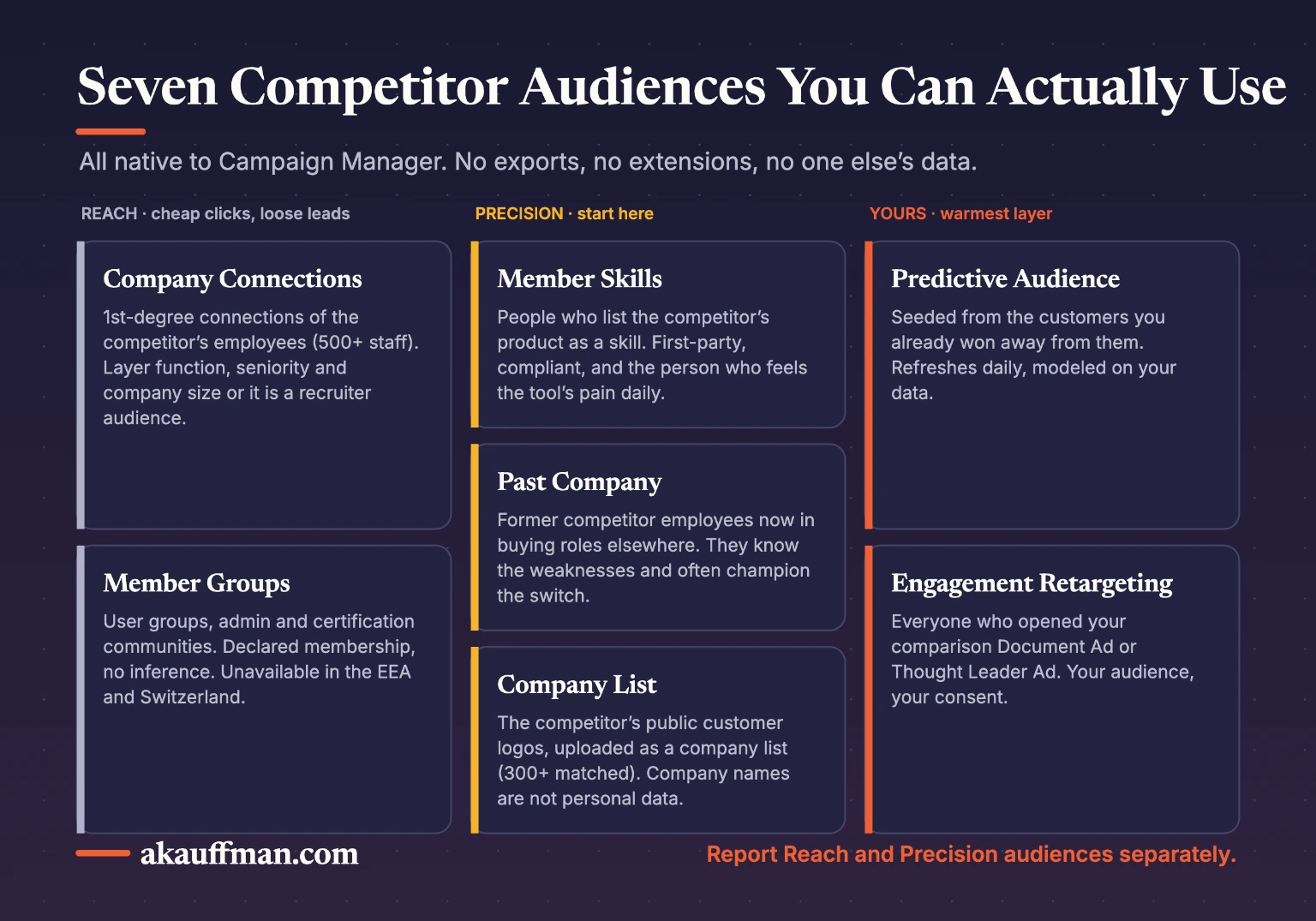
The native stack: seven ways to reach a competitor’s buyers without touching their data
1. Company Connections, filtered hard
The best-known tactic, and a good one. Company Connections reaches the first-degree connections of a competitor’s employees, and LinkedIn confirms it’s available for companies with more than 500 employees. On its own it’s noisy: recruiters, former colleagues, vendors. Layer job function, seniority and company size so you’re only paying for the connections who look like your buyer. Expect the cheapest CPCs of anything on this list and the loosest lead quality.
2. Member Skills that name the competitor’s product
This is the facet most guides skip and the one I’d test first. LinkedIn lets you target by Member Skills, which draws on skills members list, mention in their profile text, or that are inferred from their job description. Buyers and admins of a specific platform routinely list it as a skill: “HubSpot,” “Salesforce administration,” “Marketo.” That’s a direct, first-party, fully compliant signal that someone uses or runs the competitor’s product. Pair it with seniority and you’ve found the person who feels the tool’s pain daily.
3. Member Groups built around the competitor
User groups, certification groups, admin communities. Small audiences, high intent, and legitimate: LinkedIn’s targeting docs confirm Member Groups uses declared membership, no inference. Two cautions from the same page: it can’t be used to exclude, and it’s unavailable in the EEA and Switzerland.
4. Past Company: the switchers
Company Name targeting splits into current, past, and current-or-past. Target people who used to work at the competitor and now hold a buying title elsewhere. They know the product’s weaknesses better than your sales team does, and they’re often the internal champion who brings in a replacement.
5. A company list built from public logo walls
Your competitor’s customers are usually listed on their website, in case studies and in G2 reviews. Compile those company names, upload them as a company list in Matched Audiences (minimum 300 matched), then filter by title and seniority. Company names aren’t personal data, so the consent problem that sinks exported contact lists doesn’t apply. This is the account-based version of competitor targeting and, in my experience, the best lead quality of the seven.
6. Predictive audiences seeded with your own switchers
If you’ve already won customers away from a competitor, that CRM segment is the most valuable list you own. Upload it, build a predictive audience from it, and let LinkedIn find members whose profiles and behavior resemble people who already made the switch. It refreshes daily and it’s modeled on your data, not exported from anyone else’s.
7. Engagement retargeting off your own comparison content
Run a comparison guide as a Document Ad or a founder-voice Thought Leader Ad to audiences 1 through 6, then build a Matched Audience from the people who engaged with it. That engagement audience is yours, it’s compliant, and it’s the warmest layer in the funnel. It’s the same principle as earning the read before the call on Reddit: the first touch buys the right to the second.
You don’t need a competitor’s data to reach a competitor’s customers. LinkedIn already knows who lists the product as a skill, who used to work there, and who their customers are.
Converting them: what actually works
Comparison landing pages with a real side-by-side table, Document Ads that gate the second half of a buyer’s guide, three or more ad variations per audience, and a budget that follows the winner. All good, all standard. Two additions. Send the click to a page that matches the audience: a “switching from X” page for the Skills and Past Company audiences, a category page for Company Connections. And measure qualified leads, not form fills, by sending CRM stage changes back through the Conversions API; LinkedIn now supports lookback windows long enough for a B2B cycle, and a competitor campaign judged on raw leads will always look better than it is.
On naming the competitor
LinkedIn’s ad policy prohibits using another company’s trademarks in a way that implies affiliation, and comparative claims have to be true and substantiated. In practice, don’t put the competitor’s name in headlines or URLs. “Switching from your legacy CRM?” targeted at people who list that CRM as a skill does the job without the policy risk, and it reads less desperate.
The balanced take
Competitor targeting is a small, sharp campaign, not a strategy. The audiences are narrow, LinkedIn’s minimum is 300 members and the CPCs are among the highest in paid social. Run it as one line in a broader LinkedIn plan, budget it to prove qualified pipeline in 60 to 90 days, and don’t let the intent story talk you out of the math. Connections-based audiences will always show more clicks and worse leads; Skills and company-list audiences will show fewer clicks and better ones. Report them separately.
My POV
The export-and-upload shortcut is tempting because it feels precise. It isn’t; it’s a list of people who clicked “like” once, held in a spreadsheet you can’t legally use, on a platform that will eventually notice. The native facets are more precise, cheaper to maintain, and they don’t put the account at risk. A vendor sells you the shortcut. A partner builds the version you can keep running next year.
The bottom line
Skip anything that involves exporting other people’s engagement. Start with Member Skills and a public-logo company list, add Company Connections for reach and Past Company for champions, seed a predictive audience from your own switchers, and retarget engagement with your own comparison content. Measure qualified pipeline through CAPI. That’s competitor targeting you can defend to LinkedIn, to legal, and to the CFO.
Related reading: Reddit Ads: launch the ad you would defend in the comments · CPC inflation starts before the auction
Want a competitor campaign that survives an audit?
I’ll map your competitors to the seven audiences above, size each one in Campaign Manager, and tell you which two are worth funding first. Book a call.